Add Card Linked Loyalty to a merchant's payments, so customers earn and redeem rewards automatically just by paying with a linked card — no separate check-in step required.
Traditionally, a customer has to identify themselves at each purchase to be rewarded — presenting a loyalty card, or having staff look them up by name, email, or mobile. The Loyalty API removes that friction: a customer links one or more payment cards to a Member profile once, in-store, online, or through your app. From then on, whenever a linked card is used at an activated merchant location, Tyro recognises the Transaction and sends you a Loyalty event with the transaction details, so you can calculate and apply the reward.
| Requirement | Description |
|---|---|
| Integration type | Business operations (card-linked loyalty) |
| Webhooks | Loyalty events and merchant onboarding notifications — see notification events |
| Setup steps | The merchant activates your program for their location in the Tyro Merchant Portal, and your system must support merchant activation requests — see Prerequisites below |
| Limitations | On-terminal loyalty is only available on Tyro Pro Series devices |
| API reference | Jump to API reference |
- No repeat check-in: Once a card is linked, Tyro recognises it automatically on every future transaction — customers don't need to present a loyalty card or identify themselves again.
- On-terminal sign-up: Unregistered customers see rewards accumulate on the Tyro Pro Series terminal itself, then join via a QR code — no staff prompt required.
- Multiple cards per member: Customers can link more than one payment card to the same profile.
- Self-service management: Customers can unsubscribe or deregister a specific card at any time.
A backend system that maintains customer profiles, including card and customer identifiers, and any additional data your use case needs, such as transaction history.
Since this involves collecting personal information, you must ensure compliance with applicable data privacy regulations.
A reward defined per transaction, if you're supporting on-terminal loyalty.
Support for merchant activation — a webhook endpoint to receive onboarding requests, and the ability to submit an APPROVE or REJECT decision. See Activate a merchant for the full flow.
Optionally, being a Tyro eCommerce customer enables card linking through online transactions and a unified profile across in-store and online activity.
Member
A customer registered in the loyalty program with one or more linked payment cards. Members can be registered through in-store/online purchases or via a partner app.
Transaction
A payment event that triggers loyalty tracking. When a registered card is used for payment, Tyro monitors and notifies the loyalty partner with transaction details.
Loyalty event
A notification sent to loyalty partners when a registered payment card is used, containing transaction details and potentially sales data for reward calculation.
- Activate — The merchant activates your loyalty program for their location in the Tyro Merchant Portal. See Activate a merchant for the full onboarding flow.
- Register — A customer registers, or is identified, by their payment card — via terminal, eCommerce checkout, or your own app. See the integration guide for registration flows.
- Transaction — The customer makes a purchase using their linked card.
- Trigger — Tyro automatically recognises the card and prepares a loyalty notification.
- Notify — You receive a loyalty event with the transaction details.
On-terminal loyalty is only available on Tyro Pro Series devices. Once integrated, the merchant can activate and configure the styling of the on-terminal experience in the Tyro Merchant Portal.
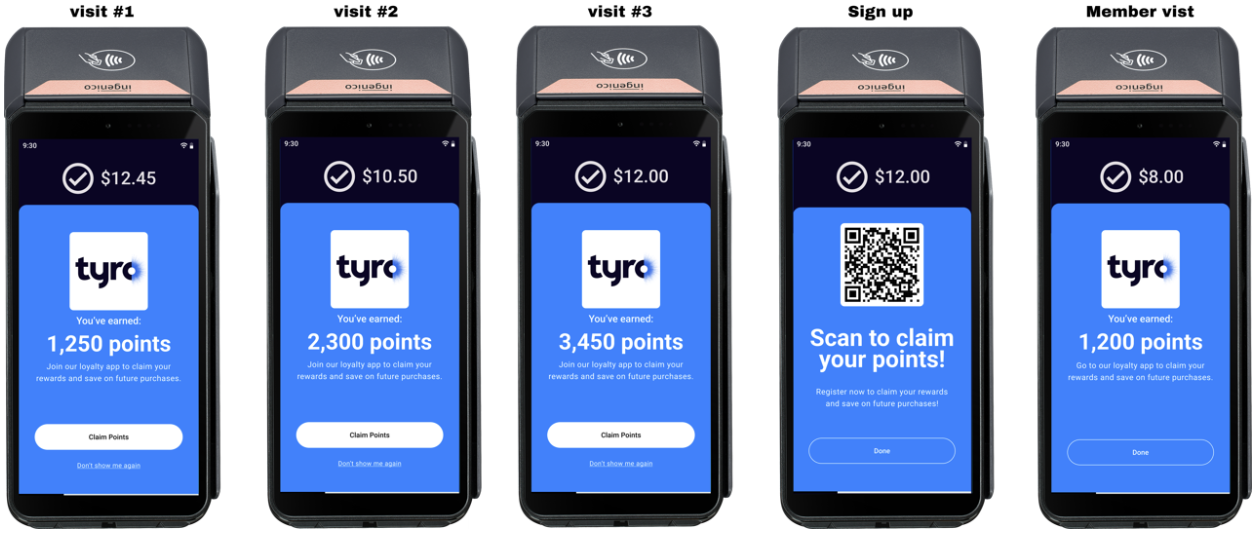
- Unregistered customers see the rewards earned on their first transaction and watch their balance grow with subsequent transactions with the merchant, even across different locations, increasing their incentive to register. Merchants can configure a reward limit for unregistered members in the Tyro Merchant Portal.
- Claiming rewards: If an unregistered member wants to claim their points, the terminal displays a QR code linking directly to the loyalty sign-up flow.
- Point transfer: When that unregistered member completes sign-up, Tyro shares their previously earned points so they carry into the initial balance post sign-up.
- Existing members see the rewards earned from their transaction immediately on the terminal, as a constant reminder that they're being rewarded.
- Device support: On-terminal loyalty is only available on Tyro Pro Series devices.
- Activation gating: A merchant location must complete activation before any loyalty activity is generated there — see Activate a merchant.
- Card linking outside terminal or eCommerce flows: If transactions don't occur through the terminal or Tyro eCommerce, linking a card typically requires a one-time $0 authorisation transaction — see Partner types and approaches.
Start with Partner types and approaches to choose the integration pattern that fits your business, then follow the integration guide to implement member registration and transaction monitoring. Testing covers validating your integration in sandbox, and Going live covers certification and production readiness.
| Endpoint | Description |
|---|---|
DELETE /loyalty/members | Deregister a member for loyalty |
POST /loyalty/members | Register member for loyalty |
GET /locations/merchant-onboarding/loyalty/{onboardingReference} | Get merchant onboarding request by reference |
POST /locations/merchant-onboarding/loyalty/{onboardingReference} | Submit a decision for a merchant onboarding request |
POST /payments/test | Create a test payment |
GET /loyalty/activities/{loyaltyActivityId} | Get loyalty activity by ID |
DELETE /loyalty/registered-cards/{registeredCardId} | Delete registered card by ID |
GET /loyalty/registered-cards/{registeredCardId} | Get registered card by ID |