Accept card and digital wallet payments on your website or mobile app by embedding Tyro's Pay Online API and Tyro.js into your checkout page.
Tyro's Pay Online API is Tyro's core online payments service for e-commerce websites and mobile applications, letting a business accept card payments directly on its own checkout page or within its app — without managing gateway mechanics directly.
Your server creates a Pay Request for the order total, then captures and submits card details against it using Tyro.js for web checkouts or the React Native SDK for mobile apps, with real-time updates delivered via webhooks.
| Requirement | Description |
|---|---|
| Integration type | Online payments (checkout) |
| Webhooks | Subscribe to Pay Request notification events to track payment status changes |
| Setup steps | Expose a server endpoint that creates a Pay Request, then add Tyro.js to your checkout page — see Getting started |
| Limitations | For PCI compliance, Tyro.js must be loaded directly from https://pay.connect.tyro.com/v1/tyro.js — it can't be bundled or self-hosted |
| API reference | Jump to API reference |
- Simplified E-Commerce Integration:: Easily embed card checkout fields into web applications using Tyro.js or into native iOS/Android apps with the React Native SDK.
- Automated Fraud Prevention & 3D Secure support: Built-in 3D Secure (3DS) authentication via GPayments to protect merchants against fraud and meet card scheme compliance.
- Digital Wallet Support: Out-of-the-box support for Apple Pay and Google Pay to reduce checkout friction and increase conversion rates.
- Saved payment methods: Customers can save a Pay Method with consent and reuse it on a future visit without re-entering card details.
- Authorise now, capture later: Separate authorisation and capture when the final amount isn't known upfront, such as at hotel check-in.
- Create a Pay Request — Your server calls Create a pay request with the order total and returns the
paySecretto your checkout page. - Collect payment details — Your checkout page initialises Tyro.js with the
paySecretand injects the Tyro Pay Form to collect card details. - Submit the payment — Tyro.js submits the payment against the Pay Request and returns the result to your checkout page.
- Track the outcome — Your server listens for notification events, or polls Retrieve a pay request, to confirm the result and act on it — for example, sending an order confirmation email.
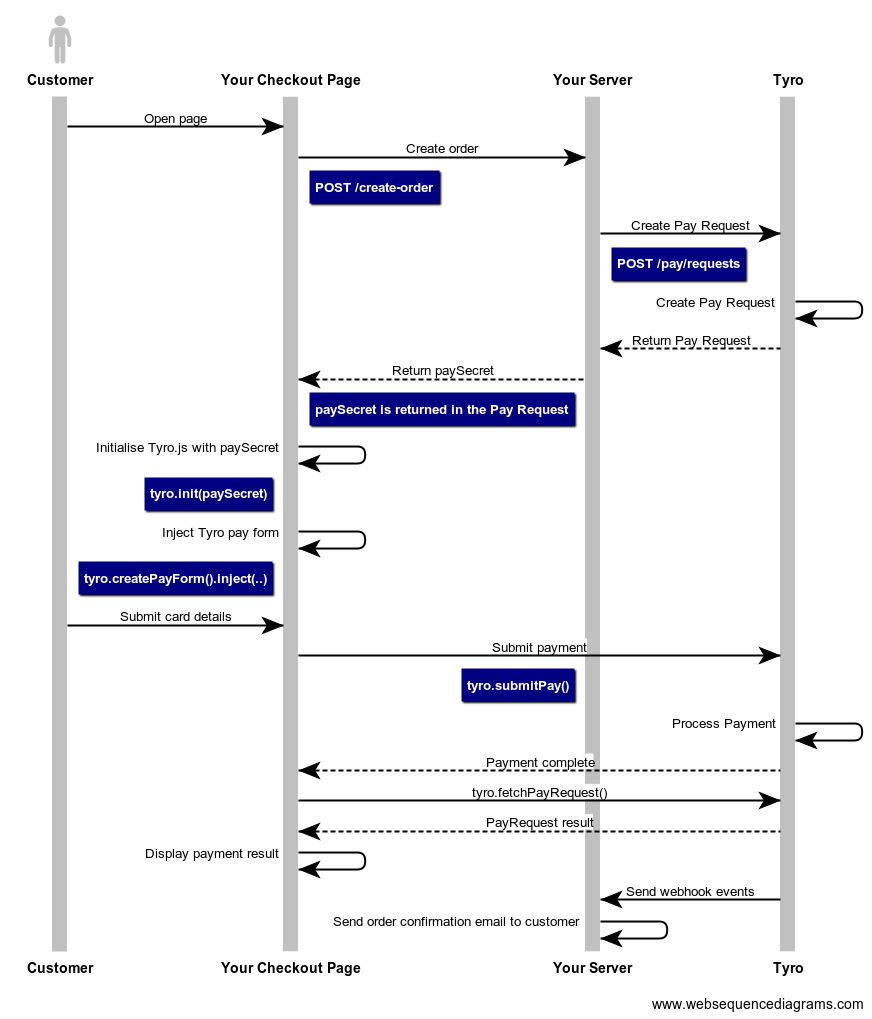
- Tyro.js hosting: Tyro.js must be loaded from
https://pay.connect.tyro.com/v1/tyro.js— bundling or self-hosting it breaks PCI compliance.
Notification events are sent throughout the lifecycle of a Pay Request — for example, when a payment succeeds, fails, or requires further customer action. See Notification events for the full list of events and payloads.
Follow the Tyro.js integration guide for step-by-step instructions and code samples to add Tyro.js to your web checkout. Building a mobile app instead, see the mobile SDKs guide.
| Endpoint | Description |
|---|---|
POST /pay/requests | Create a pay request |
PATCH /pay/requests/{payRequestId} | Update or execute actions on a pay request |
GET /pay/requests/{payRequestId} | Retrieve a pay request |
POST /pay/methods | Create a pay method |
GET /pay/methods | List pay methods |
GET /pay/methods/{payMethodId} | Retrieve a pay method |
PATCH /pay/methods/{payMethodId} | Update pay method default status |
DELETE /pay/methods/{payMethodId} | Delete a pay method |
POST /pay/refunds | Create a refund request |
GET /pay/refunds | List all refunds |
GET /pay/refunds/{refundRequestId} | Retrieve a refund request |