Build your checkout page and integrate with Pay API and Tyro.js to accept payments
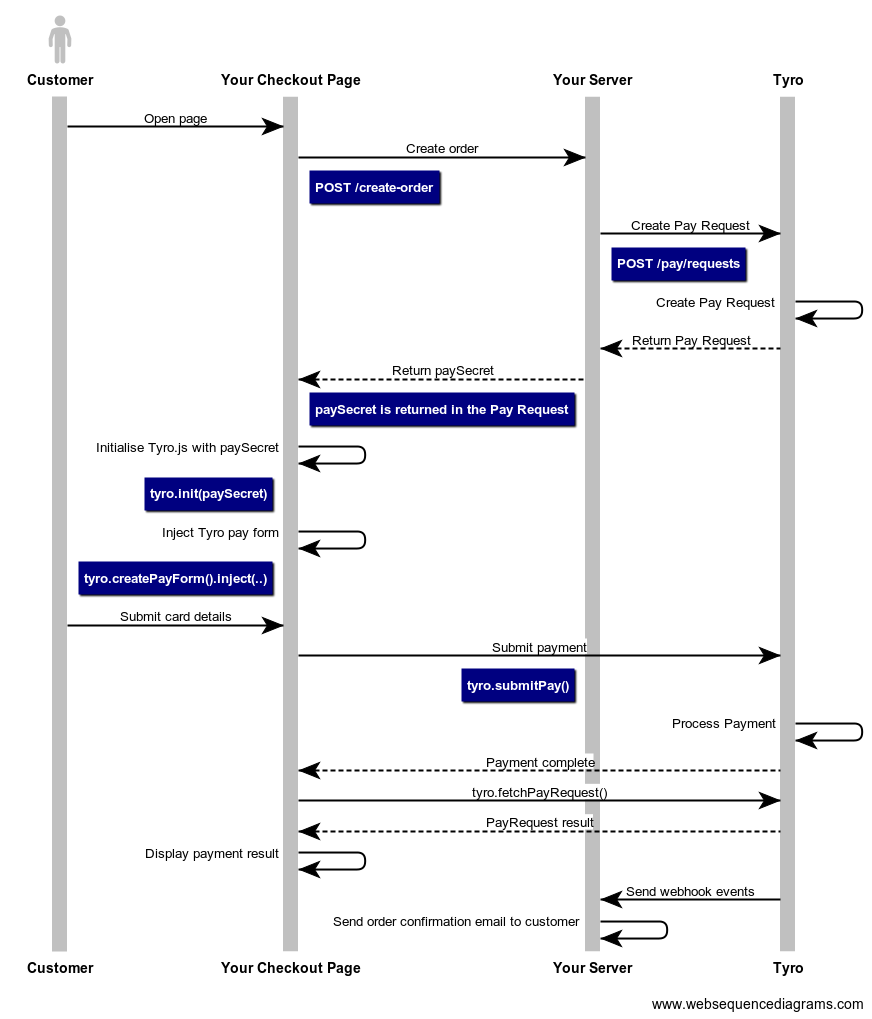
When a customer loads your checkout page, a request with the order information should be immediately sent to your sever. Your server should calculate the total of the order and send this total to Tyro when creating a Pay Request. The Pay Request Pay Secret should be returned to your checkout page.
// Node sample code
const express = require("express");
const app = express();
const axios = require('axios');

app.post("/create-order", async (req, res) => {
  const { items } = req.body;
  const totalAmountInCents = calculateTotal(items);

  // Create a Pay Request with the calculated total amount
  const payRequest = await axios.post('https://api.tyro.com/connect/pay/requests',
  {
    "locationId": "tc-examplelocation-3000",
    "provider": {
        "name": "TYRO",
        "method": "CARD"
    },
    "origin": {
        "orderId": "order123",
    },
    "total": {
        "amount": totalAmountInCents,
        "currency": "AUD"
    }
  },
  {
    headers: {
    'Content-Type': 'application/json',
    'Authorization': 'Bearer exampleJwt'
    }
  });

  res.send({
    paySecret: payRequest.paySecret,
  });
});- Add Tyro.js as a script tag in the header.
- Add the pay form and submit button. This is where the Pay Input fields will be injected.
<!-- HTML sample code -->
<!DOCTYPE html>
<html lang="en">
  <head>
    <meta charset="utf-8" />
    <title>Your checkout page</title>
    <script src="https://pay.connect.tyro.com/v1/tyro.js"></script>
  </head>
  <body>
    <!-- Set up the pay form -->
    <form id="pay-form">
      <div id="tyro-pay-form">
        <!--Tyro.js injects the Pay Input Fields -->
      </div>
      <button id="pay-form-submit">Pay</button>
    </form>
  </body>
</html>Create an instance of Tyro.js.
// Javascript sample code
const tyro = Tyro();- Send your checkout items to your
/create-orderendpoint on page load. - Your server creates the Pay Request and returns the
paySecret. - Initialise Tyro.js with the
paySecret. - Inject the Tyro Pay Form into your HTML.
let paySecret;
// Javascript sample code
async function init() {
  const response = await fetch("/create-order", {
    method: "POST",
    headers: { "Content-Type": "application/json" },
    body: JSON.stringify({ items }),
  });
  paySecret = await response.json().paySecret;
  await tyro.init(paySecret);

  const payForm = tyro.createPayForm();
  payForm.inject("#tyro-pay-form");
}

init();- Create the form submit function
- Invoke
tyro.submitPay() - Show the payment result when the promise returns without errors. Invoke
tyro.fetchPayRequest()to get the status and display the appropriate messages. - Handle any errors. For example, the customer may have provided an invalid card, an error message could be shown in this case.
- Add the form submit function as an event listener for the
#pay-formsubmit event.
// Javascript sample code
async function showPaymentResult() {
  const payRequest = await tyro.fetchPayRequest();

  switch (payRequest.status) {
    case "SUCCESS":
      return showSuccess();
    case "FAILED":
      return showFail();
    ......
  }
}


async function onFormSubmit(e) {
    e.preventDefault();

    try {
        await tyro.submitPay();
        showPaymentResult();
    } catch (error) {
        const { type, errorMessage, errorCode, gatewayCode } = error;
        // handle errors here
          switch (type) {
            case "CLIENT_VALIDATION_ERROR":
              return showClientValidationError(errorMessage);
            case "SERVER_VALIDATION_ERROR":
              return showServerValidationError(errorMessage, errorCode, gatewayCode);
            case "CARD_ERROR":
              return showCardError(errorMessage, errorCode, gatewayCode);
            case "SERVER_ERROR":
              return showGenericError(errorMessage, errorCode, gatewayCode);
            ......
          }
    }
}

document.getElementById("pay-form").addEventListener("submit", onFormSubmit);Webhook events are sent during the lifecycle of a Pay Request. Your server should listen to these events and handle them as required, such as sending an order confirmation email.