Integrate your POS with Tyro Pro payment terminals to process card payments, cashouts, and refunds in person, with real-time transaction status delivered via webhooks.
Tyro’s Pay In-Person API lets businesses initiate and manage transactions from their own Point of Sale (POS) systems, while Tyro Pro handles the payment interaction at the terminal.
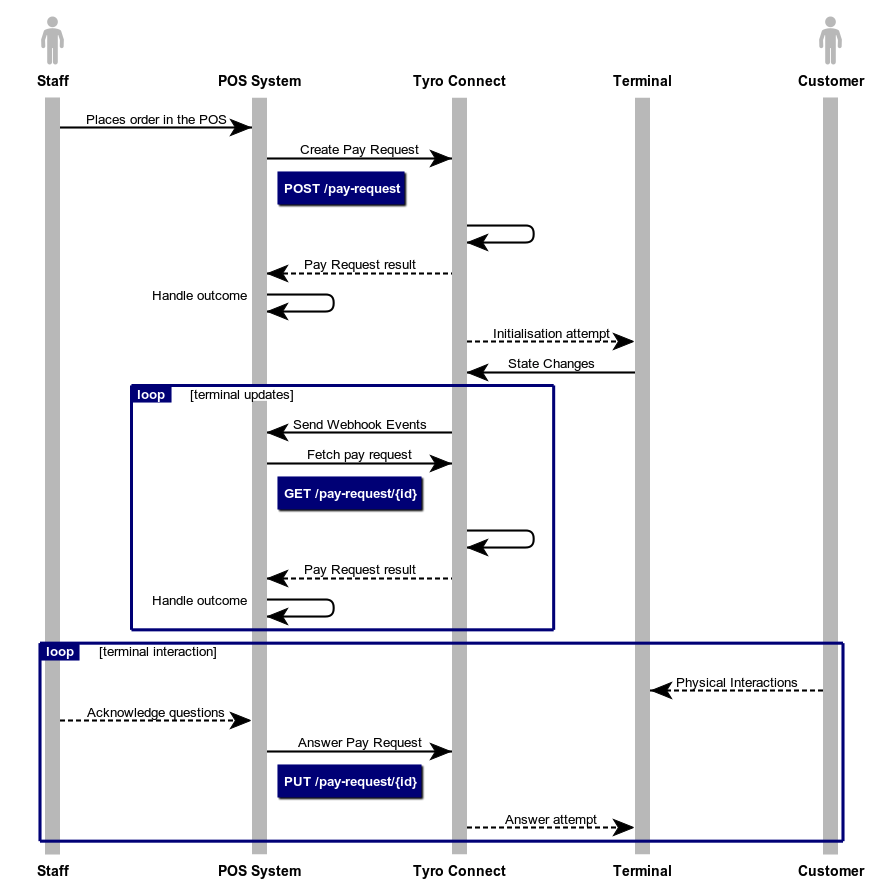
Your POS creates a Pay Request for the transaction, such as a payment, cashout, or refund, then sends it to the terminal for processing. Real-time updates are delivered to your POS via webhooks.
| Requirement | Description |
|---|---|
| Integration type | In-person (POS/terminal) |
| Webhooks | This API is notified exclusively via webhooks — see Webhook events |
| Setup steps | Merchant authorises your POS in the Integration Portal, enables Integrated mode on each Tyro Pro, then pairs it — see Account authorisation |
| Limitations | Rate limited to 1 request per 250ms per merchant/terminal combination — see Conditions and limitations below |
| API reference | Jump to API reference |
- Operational efficiency: Payment processing happens inside your existing POS, so there's no need to switch systems or re-enter transaction data.
- Improved customer experience: All payment interactions happen in one unified interface, for faster, smoother service.
- Reliable status updates: Webhooks notify your backend of every transaction event — such as successful payments or failures — so you always have accurate, timely status.
- The merchant must authorise your POS to integrate with their Tyro account(s) (MIDs) via Tyro's Integration Portal.
- Integrated mode must be enabled on each Tyro Pro terminal that will be used.
- Each terminal must be paired with the POS.
See Account authorisation for the full walkthrough, including portal screenshots.
- Create a Pay Request — Your POS sends the merchant ID, terminal ID, amount, and a unique transaction identifier to Create a pay request, which triggers the terminal to start processing.
- Receive status updates — The terminal's progress, such as "waiting for PIN" or "completed", is delivered to your system as webhook events.
- Fetch details if needed — Call Retrieve a pay request for the latest status and full details, such as approval codes and receipts, if a webhook is missed or for reconciliation.
- Respond to prompts or cancel — Send an answer to a terminal prompt, such as "Would you like a receipt?", via Answer a terminal prompt, or cancel the transaction via Cancel a pay request.
- Rate limiting: Requests are limited to 1 per 250ms per merchant/terminal combination. Exceeding this returns a
RATE_LIMIT_EXCEEDEDerror — bank or debounce requests to avoid it. - Terminal availability: A Pay Request may not reach the terminal if it's offline or its network is down. You can safely retry the same Pay Request, unchanged, using the same
origin.transactionId.
This API delivers updates exclusively via webhooks, for timely and reliable delivery to your endpoints. See Webhook events for the full list.
If your system needs notifications through another mechanism, such as websockets, please raise a support request using our new Integration Support Portal.
Follow How to use for a detailed walkthrough of creating and managing Pay Requests, including rate limits and edge cases. Testing covers simulating terminal responses in sandbox mode without a physical terminal, and Error codes lists the errors you may need to handle.
| Endpoint | Description |
|---|---|
POST /pay-terminal/merchants/{merchantId}/authorise/test | Authorise a sandbox merchant ID |
GET /pay-terminal/merchants/{merchantId} | Fetch a merchant |
GET /pay-terminal/merchants | Lists merchants |
GET /pay-terminal/merchants/{merchantId}/terminals | Lists the terminals available to a merchant |
PUT /pay-terminal/requests/{payRequestId} | Answer a terminal prompt |
DELETE /pay-terminal/requests/{payRequestId} | Cancel a pay request |
POST /pay-terminal/requests | Create a pay request |
GET /pay-terminal/requests/{payRequestId} | Retrieve a pay request |