Integrated receipts let the POS take over receipt printing from the terminal — useful for combining the EFTPOS receipt with the POS sales receipt, or where a terminal has no printer of its own. Every integration path treats a merchant copy and a customer copy as distinct:
- Merchant copy — printed at authorisation. Optional in general, but mandatory whenever signature verification was required to approve the transaction (a shrinking but non-zero share of international cards). Signature-verification merchant copies must be retained by the merchant for 120 days, in case of a cardholder chargeback.
- Customer copy — printed on completion of the transaction, and must be made available to the cardholder for every outcome, including declined, cancelled, reversed, and system error.
Whichever integration path you use, the receipt content returned to the POS must be printed or stored in the POS journal without modification.
- Merchant copies only need to be retained/printed for signature-verification transactions — for PIN, tap-and-go, etc., there's no obligation to print one, though many merchants still want the option, so it's worth a POS setting either way.
- Customer copies can be combined with the POS sales receipt (e.g. a single combined docket), or offered on request and reprinted on demand — whichever suits the environment.
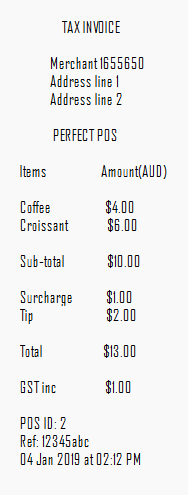
If you've implemented Surcharge or Tipping, both amounts must appear on the POS tax invoice as their own line item, so the cardholder can see the full charge to their card. Both are available from the transaction result — documented for the JS library only; see its tab below for a worked example.
DCC lets Mastercard and Visa international cardholders pay in their card's currency at a transparent exchange rate, offered by the terminal when DCC is enabled and a foreign-currency card is used. The same rules apply to DCC receipts as normal receipts, but a DCC receipt is much larger (around 1200 characters) since it must carry the full terms and conditions of the DCC transaction.
The following disclosures must be present in full on any DCC receipt — none of this content may be edited, truncated, or left out:
- Local transaction amount
- Local currency symbol
- DCC transaction amount
- DCC currency symbol
- Exchange rate
- Commission/fee
- The words "Transaction Currency"
- Proof of the cardholder's choice
- A statement that the cardholder was offered a choice
- A statement of who is providing DCC
All of this is included in the receipt data returned to the POS — see the platform-specific tabs for exactly which field/event carries it. If integrated receipts are disabled, the customer copy must be printed through the terminal and presented to the cardholder by the merchant instead.
Before you begin, check the certification criteria: Certification Criteria Document.
transactionCallbacks (Object): the set of callback functions below provide feedback and the transaction result. For general callback handling, see Payment, cashout and refund.
| Parameter | Purpose |
|---|---|
integratedReceipt (Boolean) | A boolean flag specifying whether integrated receipt printing is on or off. |
The parameter is present in the requestParams object of the following functions:
| Function | Description | Usage required |
|---|---|---|
initiatePurchase | The function used to initiate a purchase. | Required |
initiateRefund | The function used to initiate a refund. | Required |
initiateOpenTab | The function used to open a tab. | Required |
initiateOpenPreAuth | The function used to open a pre-auth. | Required |
| Value | Behaviour |
|---|---|
false | The Tyro terminal prints. No receipt data is returned to the POS. |
true | iClient calls receiptCallback with the merchant copy, and includes the customer copy on transactionCompleteCallback. |
A $10.00 purchase transaction with integrated receipts turned on:
var amount = '1000';

function doPurchase(amount) {
    iclient.initiatePurchase({
        amount: amount,
        cashout: "0",
        enableSurcharge: true,
        integratedReceipt: true
    }, {
        receiptCallback: receiptCallbackImpl,
        transactionCompleteCallback: transactionCompleteCallbackImpl
    });
}Don't click Save if you make changes in the JS Fiddle — click Run instead. Clicking Save may break the fiddle's functionality.
The integrated receipts feature uses transactionCompleteCallback and receiptCallback; the specification of relevant fields is given below.
| Function | Description | Usage required |
|---|---|---|
receiptCallback | Invoked when integrated receipts are enabled and a merchant copy of the receipt is available. Ignored if integrated receipt printing is disabled. Called with the following parameters as part of the receipt object. | Required (if integrated receipts are enabled) |
| Field | Type | Description | Usage required |
|---|---|---|---|
signatureRequired | Boolean | Indicates whether a signature line should be printed and a customer signature collected. | Required |
merchantReceipt | String | Text representation of the Tyro receipt intended for the merchant. Formatted to be printed in a monospaced font. | Required |
A merchant copy is printed at the authorisation of each transaction. Merchant copies are optional (except those requiring a signature, see below) but you should assess whether your POS users would like the option. The merchant copy can be retrieved from receiptCallback and should be printed immediately after it's returned.
There are two types of merchant copies: those that require signature verification and those that don't. The majority of transactions won't require a signature, since signature verification has been gradually phased out since 2014, but a number of international cards still require one.
If signature verification is required, a merchant copy with a signature line is printed, and the Tyro UI asks the user whether the signature matches the one on the card. If they select "Yes", the transaction completes and a customer copy is printed. If they select "No", another merchant copy is returned via receiptCallback showing the transaction was cancelled. The signature-verification merchant copy must be retained by the merchant for 120 days, in case of a cardholder chargeback.
- Create the callback function to handle the
receiptCallbackresponse — the POS must undertake the required actions to print the receipt. - Check the
signatureRequiredboolean: iftrue, the receipt is a signature-verification merchant copy and is not optional — it must be printed. - If
signatureRequiredisfalse, the POS can choose to print the receipt depending on its merchant copy printing configuration.
var receiptCallbackImpl = function (receipt) {
    console.log("Merchant Receipt = " + JSON.stringify(receipt));
    $("#merchantReceipt").html(formatReceipt(receipt.merchantReceipt));
};{
"merchantReceipt":
" MERCHANT COPY \n
\n
Merchant 1655650 \n
Address line 1 \n
Address line 2 \n
\n
Tyro EFTPOS \n
\n
EFTPOS\n
Card: XXXXXXX9953(s)\n
\n
Purchase AUD $100.00\n
----------\n
Total AUD $100.00\n
\n
APPROVED W/ SIGNATURE 00\n
\n
Terminal ID: 1\n
Transaction Ref: 160086\n
Authorisation No: F99047\n
03 Jan 2019 at 11:56 AM\n
\n
\n
----------------------------\n
Signature\n",
"signatureRequired":true
}{
"merchantReceipt":
" MERCHANT COPY \n
\n
Merchant 1655650 \n
Address line 1 \n
Address line 2 \n
\n
Tyro EFTPOS \n
\n
EFTPOS\n
Card: XXXXXXXXX7002(s)\n
\n
Purchase AUD $100.00\n
----------\n
Total AUD $100.00\n
\n
APPROVED 00\n
\n
Terminal ID: 1\n
Transaction Ref: 116494\n
Authorisation No: N02109\n
03 Jan 2019 at 11:54 AM\n",
"signatureRequired":false
}| Function | Description | Usage required |
|---|---|---|
transactionCompleteCallback | Invoked when the transaction has been completed on the terminal. Called with a customer receipt string field as part of the transactionData object, as shown below. | Required |
| Field | Type | Description | Usage required |
|---|---|---|---|
customerReceipt | String | Text representation of the Tyro receipt intended for the customer. Only included if integrated receipt printing is enabled. Formatted to be printed in a monospaced font. | Required |
Customer copies are printed on the completion of a transaction. They must be made available to the cardholder for all transactions, including unsuccessful ones — declined, cancelled, reversed, and system error. Retrieve the customer copy from the customerReceipt field of transactionCompleteCallback.
- Obtain the pre-formatted customer copy receipt from the
customerReceiptfield in the callback function. - Undertake all the steps required to manipulate the POS sales invoice and add the customer copy to it.
- Print the integrated receipt.
var transactionCompleteCallbackImpl = function (response) {
    console.log("Response = " + JSON.stringify(response));
    if (response.customerReceipt) {
        console.log("Customer Receipt = " + JSON.stringify(response.customerReceipt));
        $("#customerReceipt").html(formatReceipt(response.customerReceipt));
    }
    $("#result").html(formatResult(response));
};
{
"result":"APPROVED",
"transactionId":"3783ea1cacae254808490fcf60bbd4eb221e",
"cardType":"MasterCard",
"transactionReference":"602145",
"authorisationCode":"031054",
"issuerActionCode":"00",
"elidedPan":"xxxxxxxxxxxx5100",
"rrn":"602145141255",
"tipAmount":"1000",
"baseAmount":"101.00",
"transactionAmount":"101.00",
"customerReceipt":
	"      CUSTOMER COPY       \n
	\n
	      Merchant 1655650     \n
	      Address line 1       \n
	      Address line 2       \n
	\n
	    Tyro Payments EFTPOS   \n
	\n
	MasterCard\n
	Card:    xxxxxxxxxxxx5100(s)\n
	\n
	Purchase     AUD     $100.00\n
	Surcharge    AUD       $1.00\n
                  ----------\n
	Total        AUD     $101.00\n
	\n
	APPROVED                  00\n
	\n
	Terminal ID: 8\n
	Transaction Ref: 602145\n
	Authorisation No: 031054\n
	04 Jan 2019 at 02:12 PM\n"
}If you've implemented Surcharge or Tipping, both amounts must be included in the tax invoice as their own line item so the card user is aware of the full charges to their card. The surcharge amount and tip amount can both be retrieved from transactionCompleteCallback.
An example of a DCC receipt, as returned in receiptCallback and transactionCompleteCallback:
       CUSTOMER COPY

       Merchant 99921
       Address line 1
       Address line 2

        Tyro EFTPOS

Visa
Card: XXXXXXXXXXXXX7508(s)

Purchase     AUD     $112.00

     Transaction amount
         EUR 37.56
       Exchange rate
      1 AUD = 1.1 EUR

With Dynamic currency
conversion, I have been
offered by the merchant a
choice of currencies for
payment, Australian Dollars
or my home currency. The
payment in my home currency
at the point of sale is
converted at the Pure
Commerce provided wholesale
rate including a 5% mark-up.

This Dynamic Currency
Conversion is not associated
or endorsed by VISA.

Alternatively I can pay in
Australian Dollars which is
later converted into my home
currency at a rate selected
by my issuing bank.

I understand that my
selected transaction
currency is final.

The cardholder expressly
agrees to the transaction
receipt information by
marking the accept box
below.

            [x]

APPROVED                  00

Terminal ID: 1
Transaction Ref: 257248
Authorisation No: E73642
17 Feb 2024 at 06:40 PM
Result: APPROVED
Card type: Visa
Trans ref: 257248
Auth code: E73642
Action code: 00