JS library only.
Before you begin, check the certification criteria: Certification Criteria Document.
There's no iClient function to initiate a split payment — instead, split payments let the POS process a single purchase or refund as multiple separate transactions, of either payment type (EFTPOS or cash). For example, a $100.00 purchase might be split into 1 x $50.00 EFTPOS, 1 x $25.00 EFTPOS, and 1 x $25.00 cash transaction.
Splitting the transaction, initiating and processing each individual split-payment transaction, managing the overall sale workflow — including validation such as overtendering checks, and other logical tasks such as printing receipts, closing off the sale, and registering the sale with all of its constituent split-payments — are all tasks the POS must perform itself.
A sample sequence diagram, showing some of the actions and interactions that are part of a split-payment workflow:
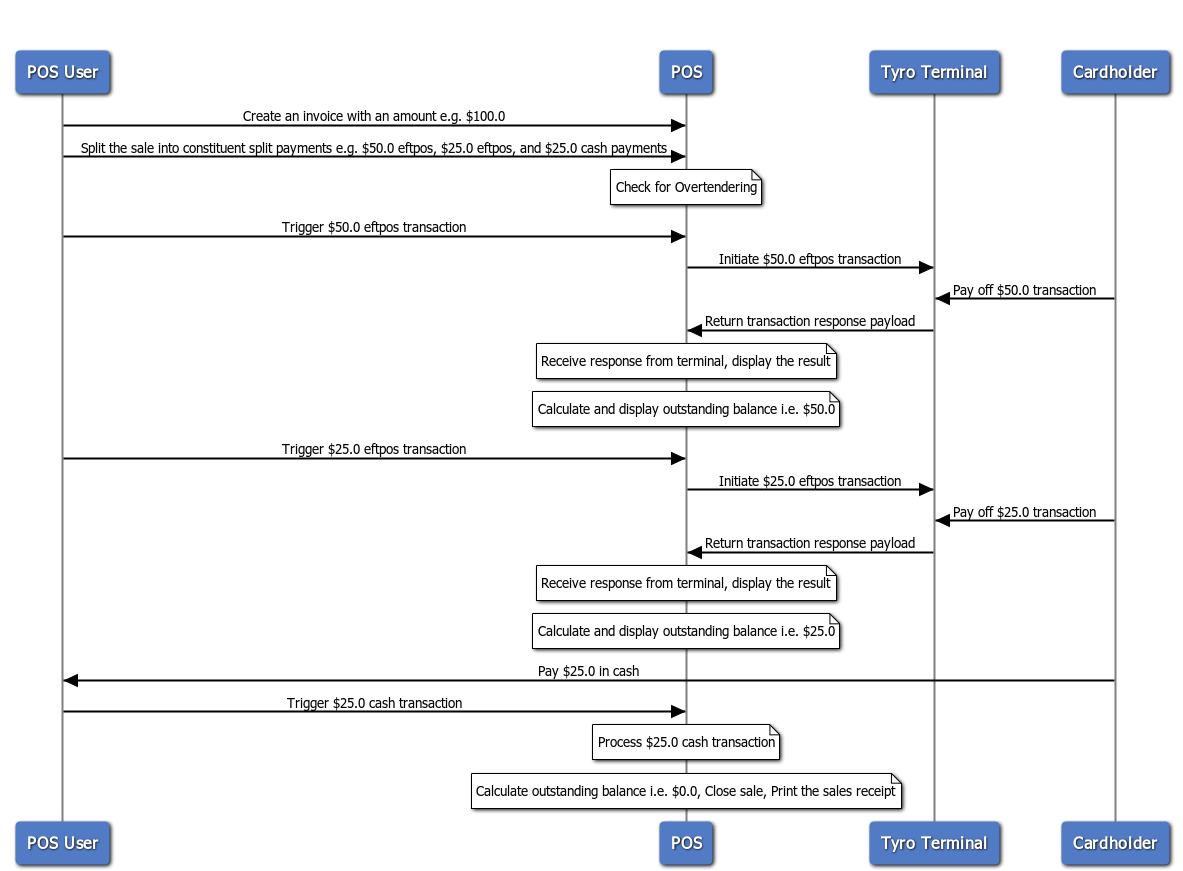
Split payments only apply to the purchase and refund features. There may be additional actions the POS needs to perform as part of the split-payment workflow, and there are other valid ways to implement this feature from a user interface and user experience perspective. Check the certification criteria when developing your split-payment feature, and ensure every criterion is met regardless of your chosen implementation.
JS Fiddle demo — select the transaction amount from the drop-down and press "Set Amount", then choose the split amount for each split-payment from the second drop-down and initiate it with the "Tyro EFTPOS" or "Cash" buttons.
Don't click Save if you make changes in the JS Fiddle — click Run instead. Clicking Save may break the fiddle's functionality.